
Gallery
✨ ExtenIntel Summary
- •Supports multiple languages with automatic detection for English and Russian.
- •Easy navigation with keyboard shortcuts for control over reading speed and sentence progression.
- •Highlights the current sentence and offers auto-scrolling for seamless listening experience.
✓ Top Pros
- • Simple and effective functionality
- • Clean interface that highlights text while reading
× Top Cons
- • Does not perform as expected for some users
- • Lacks customization options for keyboard shortcuts
Full Developer Description
This extension helps you read websites aloud by using Google Chrome text-to-speech engine.
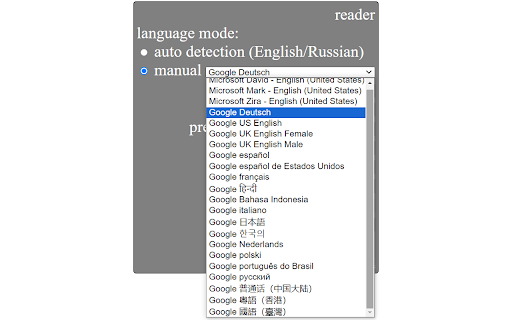
It can automatically detect the language of the current sentence (currently supported for English and Russian). Also, you can manually choose any language among supported by Google Chrome text-to-speech engine: English, Deutsch, Español, Español de Estados Unidos, Français, हिन्दी, Bahasa Indonesia, Italiano, 日本語, 한국의, Nederlands, Polski, Português do Brasil, Русский, 普通话(中国大陆), 粤語 (香港), 國語 (臺灣).
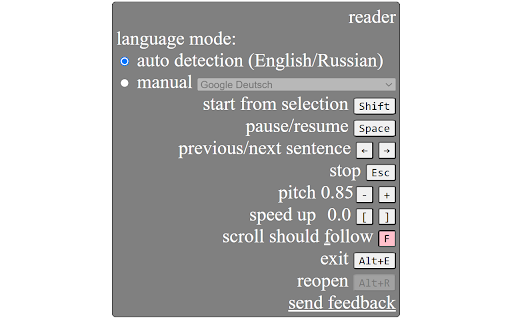
You can conveniently control the extension using keyboard shortcuts: go to previous/next sentence, start/pause, change speed etc.
When you listen, the current sentence is always highlighted (selected) on the webpage. There is also a convenient option of auto-scrolling to follow the current sentence.
How to use:
Quick start: select any part of a sentence on a web page where you want to start reading and press Alt+R (or click the extension icon). Extension widget will appear and will start reading. Mouse over the widget to see all the options and keyboard shortcuts. Most commonly you will use Shift to start from current selection, Esc to stop, Space to pause/resume, left and right arrows to go to previous/next sentence.
Enjoy reading aloud!
User Feedback

Slava Lishnevsky
★★★★★
"Excellent extension."

RJ
★★★★★
"Thankyou Mr. developer for making this extension. i wish you put this extension icon, when i select the text and right click options. like every popular text to speech reader. some even show a small icon of their extension, when you select some text on screen."

Wang Reng
★★★★★
"Please allow me to modify the keyboard shortcuts, as the default shortcuts conflict with those on the webpage."
Top Read aloud with auto language detection Alternatives
Compare pricing, features, and user reviews against the best Read aloud with auto language detection competitors.
VS

Read full comparison →
VS

Read full comparison →
VS

Read full comparison →
VS

Read full comparison →
App Intel
ExtenIntel Curated
Hand-selected based on user adoption, feature quality, and store sentiment.