
Gallery



✨ ExtenIntel Summary
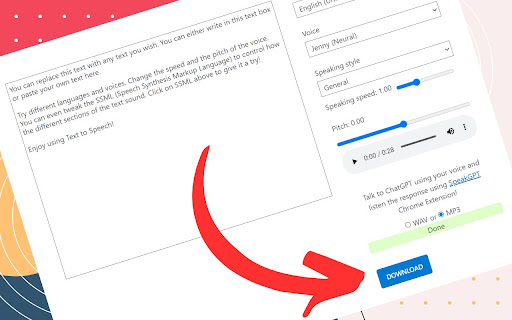
- •Easily generate and download voice from text on supported sites like Microsoft Azure and Google TTS.
- •Download audio files in MP3 or WAV format with a simple click of a button.
- •Access enhanced features with the paid version for an improved user experience.
✓ Top Pros
- • Works well for long text processing
- • Free and ad-free with unlimited words (initially)
× Top Cons
- • MP3 export is corrupted and contains audio glitches
- • Issues with downloading files and errors related to tokens and character limits
Full Developer Description
After installing this extension, simply visit one of our supported sites listed below and begin generating voice from your text 🌱:
🤖 Microsoft Azure
https://azure.microsoft.com/en-us/products/ai-foundry/tools/speech
🤖 Google TTS
https://www.gstatic.com/cloud-site-ux/text_to_speech/text_to_speech.min.html
🤖 ChatGPT from OpenAI 👉 You need to click the speaker button download the voice
https://chatgpt.com/c/your-conversation-id
We have a lot of supported sites, see full list:
👉 https://pastebin.com/6yi6qbnt
See common FAQ:
👉 https://pastebin.com/R8cpgwLV
Supported browsers:
🍪 All browsers that support Chrome extension installation (including Android, iOS, and Windows) are compatible with AudioTTS.
👉 We bring Azure Text-to-Speech Demo Page back to Life! Looking to download text-to-speech audio files from Microsoft Azure, Google, or HeyGen demo pages? Look no further than AudioTTS, the easy-to-use Chrome extension that makes downloading these files a breeze!
👉 With AudioTTS, simply install the extension and visit any of the supported demo pages to get started. Click the "Download", "Speaker Button" or "Speak" button, and your audio file will be ready to download in either MP3 or WAV format.
👉 And if you run into any issues with AudioTTS, our friendly support team is here to help. Just head over to the Support Tab to submit your question or suggestion or quick chat with me https://wa.me/6287889486240
👉 We are excited to announce that our extension is now available as a paid version! With the paid version, you'll get access to even more powerful features and functionalities that will enhance your browsing experience. Upgrade today and take advantage of everything our extension has to offer!
👉 As of version 2.0.35 in ChatGPT, you can change the file type to MP3 or Opus instead of the default AAC. Alt+Click anywhere on the ChatGPT website to change the audio format and download behavior.
User Feedback

Imed Azzi
★★★★★
"The MP3 export is corrupted and contains audio glitches. Further processing is required."

Work
★★★★★
"Good."

minh akira01
★★★★★
"I use gemini to download tts but file cannot download. Developer should check it. Thank you and hope to see you soon"
Top AudioTTS Alternatives
Compare pricing, features, and user reviews against the best AudioTTS competitors.
VS

Read full comparison →
VS

Read full comparison →
VS

Read full comparison →
VS

Read full comparison →
App Intel
ExtenIntel Curated
Hand-selected based on user adoption, feature quality, and store sentiment.